
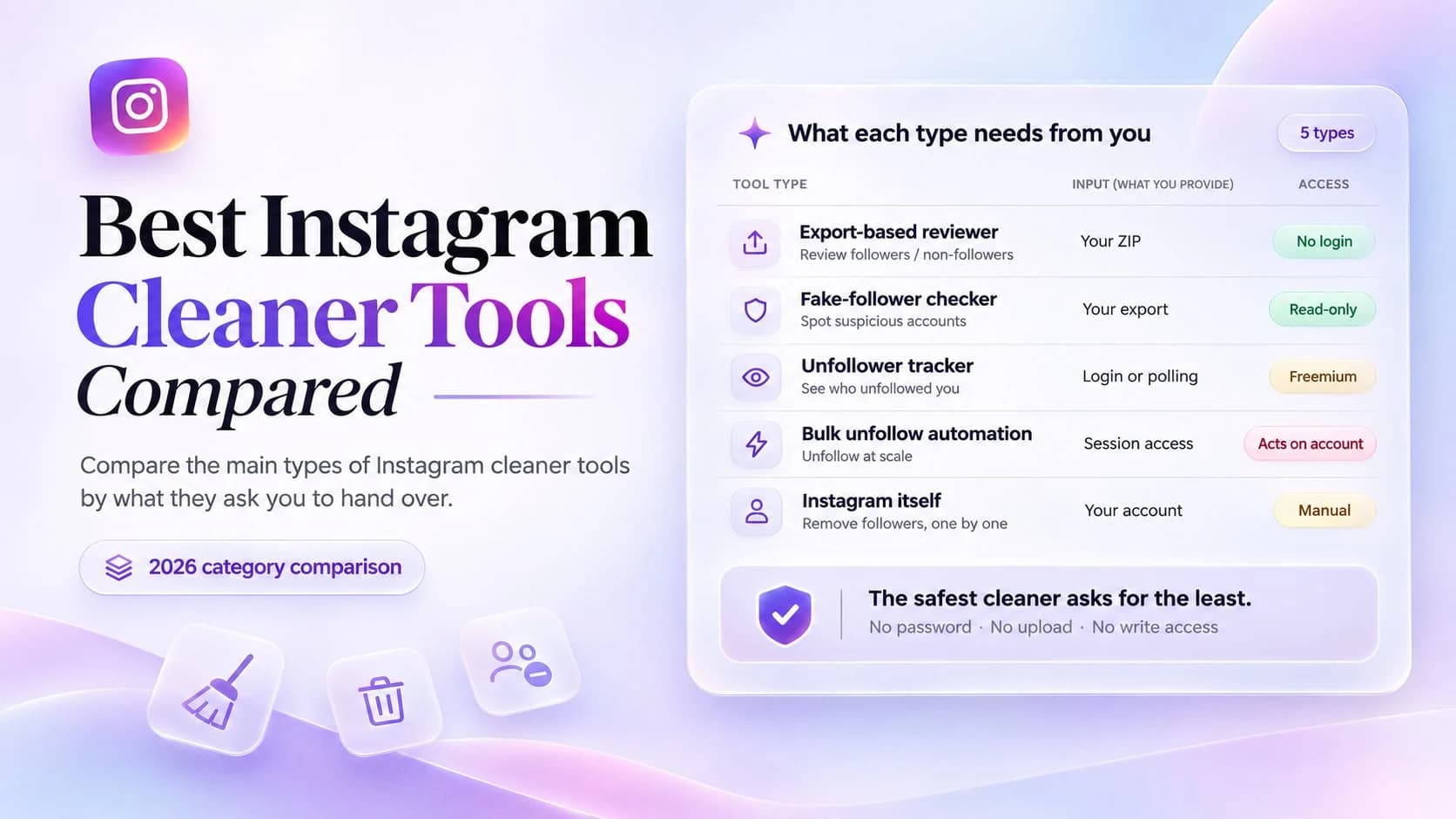
“Instagram cleaner” is not a product category Instagram recognises. It is an umbrella word that marketing has stretched over four different jobs, some of which a third-party tool cannot do at all. This page maps the category so you can tell which kind of product you are looking at. Individual unfollow tools are reviewed in their own comparison.
Quick answer
If you want to tidy up who you follow, an export-based browser tool is the fit: free, no login, nothing uploaded, and read-only. If you want to remove followers, only Instagram itself can do that, one account at a time. If you want to spot fake followers, a browser checker can identify them but removal stays manual.
The one option to be careful with is bulk unfollow automation. It needs your login, it acts on your account, and it is the category that gets accounts temporarily restricted. Unfollowing in the app at a human pace is slower but does not carry that risk.
So the deciding question is not which tool has the longest feature list. It is what does this tool need from you — your ZIP, your password, or permission to act on your behalf.
What “Instagram cleaner” actually means
Four jobs get sold under this one label. They use different data, carry different risks, and no single product does all of them well:
- Cleaning up who you follow. Finding accounts that do not follow you back, inactive accounts, or people you simply no longer want in your feed. This is a comparison between two lists in your data export, and it is the only one of the four that is fully solvable offline.
- Cleaning up your followers. Removing a follower or restricting an account. This happens in the Instagram app only. Removing a follower is a manual, per-account action; there is no bulk equivalent and no third-party API for it.
- Cleaning up fake or bot followers. Identifying suspicious accounts from signals, then deciding what to do. Detection can be automated with a browser-side fake follower check; removal cannot. The fake follower removal guide separates those two steps.
- Cleaning up the record. Working out who left, when you followed someone, or how the list changed. That needs timestamps and, for unfollowers, two separate exports rather than one.
A product calling itself a cleaner may do only the first of these. Reading the noun tells you nothing; read the input instead.
How to choose an Instagram cleaner
Feature counts are close to useless here, because the risky parts are rarely listed on a pricing page. We grouped tools by four requirements instead:
- What does it need to see? Your own export, your login, or a public profile. These are three very different levels of access.
- Where does your data go? “No login” and “no upload” are not the same promise. A browser tool can process everything on your device, while a server-side one holds a copy of your social graph.
- Does it act on your account? Reading a list is read-only. Unfollowing or removing in bulk is automation, and automation is what Instagram rate-limits.
- What can it honestly report? An export is a snapshot. A tool claiming to read unfollow history out of a single ZIP is describing data that is not in the file.
We did not score tools against each other here. This is a map of the types; the ten-tool shortlist with per-product trade-offs lives in the dedicated unfollow comparison.
Quick comparison of the five types
| Type | What it cleans | Needs from you | Acts on account | Typical cost |
|---|---|---|---|---|
| Export-based reviewer | Following list, non-followers | Your ZIP, no login | No | Free |
| Fake-follower checker | Suspicious accounts | Your export or a public handle | No | Free |
| Unfollower tracker | Follower changes over time | Login or ongoing polling | No, but has access | Freemium |
| Bulk unfollow automation | Following list at scale | Login or connected session | Yes | Subscription |
| Instagram itself | Followers, following, one by one | Your own account | Yes, manually | Free |
The table is deliberately about types, not brands. Two tools in the same row can still differ on where your file is processed, which is the next thing to check.
The types, by what they need from you
1. Export-based reviewers — your file, nothing else
You request an archive from Accounts Center, then open it in a browser tool that compares followers_1.json against following.json. No account connection exists, so there is nothing a third party could do on your behalf even if it wanted to. Instagram Cleaner works this way, as do other no-login checkers in the same family. If you do not have the file yet, the data export guide covers the request itself.
The honest limit is that a single archive describes one moment. It cannot tell you who unfollowed you last month, and no setting in the export form changes that. Two exports compared can, because you supplied the earlier snapshot yourself.
2. Browser-side fake-follower checkers — signals, not removals
These flag accounts that look automated from patterns such as follower ratios, empty profiles or naming. They are read-only and usually free. What they cannot do is act: removing a flagged follower still happens in the app, one at a time. Be sceptical of any checker that also promises to clear them for you.
3. Unfollower trackers — ongoing access in exchange for history
Trackers promise something an export cannot: a running log of who left. To deliver that they need to observe your account repeatedly, which means either a login or continuous polling of public profile data. That is also why this group is usually subscription-based, and why it is the group to read the privacy policy of before connecting anything.
Some tools in this space are explicit that they rely on polling rather than an official feed. Others are less clear. A useful sanity check: if a tool claims real-time unfollow detection without any access to your account, ask where the timeline came from.
4. Bulk unfollow automation — the risky category
Automation tools log in and unfollow on your behalf. Instagram treats high-volume, machine-paced actions as a signal, so these are the products most associated with temporary action blocks. They are also the only type here that can change your account without you confirming each step. If your goal is a smaller following list, doing it manually in paced batches is slower and considerably safer.
5. Instagram itself — free, manual, and the only way to remove followers
It belongs in any honest comparison. The app is the only place where a follower can be removed, and it is the baseline against which every other option should be measured. For a short list, it is also the fastest route.
Free vs paid
The pricing model is a surprisingly good proxy for the access model. A free export-based reviewer can be free because the compute happens in your browser and the provider stores nothing. A subscription usually pays for continuous tracking — servers that keep checking, a session that stays connected, and a history that has to be stored somewhere.
So when a tool is free, ask what it costs to run. If the answer is “nothing, it reads your file locally”, that is a coherent free product. If the answer is advertising or an unclear data policy, then the price is being paid with the export rather than with money. Neither is automatically wrong, but the second one deserves the same scrutiny you would give a tool that asked for your password.
There is also no strong reason to pay for a one-off review. If you want to know who does not follow you back today, a free browser tool and your own ZIP answer the question completely.
Cleaner vs unfollow tool: different jobs
These two phrases get used interchangeably, and that is where most comparison articles go wrong. Cleaner is the category label. Unfollow tool is one job inside it — reducing the list of accounts you follow. A cleaner may also cover follower removal, fake accounts or change tracking; an unfollow tool does not.
If the only thing on your list is deciding which unfollow tool to use, read the 10 best Instagram unfollow tools comparison. It evaluates individual products one by one, which this page deliberately does not. If you are still deciding what kind of tool you need at all, you are in the right place.
Which type fits your task
- See who does not follow you back: an export-based browser reviewer. Add your ZIP to the tool and read the grouped result; nothing is uploaded.
- See who unfollowed you recently: two exports from different dates, compared locally. A single file will not do it.
- Remove one specific follower: the Instagram app. No third party is needed or able to do this in bulk.
- Spot fake or inactive accounts: a browser checker for detection, then manual removal in the app.
- Unfollow hundreds of accounts: do it in paced batches in the app, not with an automation tool holding your session.
Across all five, the safest and most legitimate option is the one that asks for least: no password, no installation, no upload, no write access. That is a structural guarantee rather than a promise in a privacy policy, and why the browser-local approach works is documented in detail. The related rule is worth repeating too: no export-based task needs your password, so a login prompt is a red flag rather than a setup step.
Frequently asked questions
What is an Instagram cleaner?
An umbrella term, not an official Instagram feature. Products using it do one of four different jobs: reviewing who you follow, removing or restricting followers, spotting fake accounts, or tracking follower changes. Check which job a tool actually does before assuming it covers the others.
Are Instagram cleaners safe?
It depends on what the tool needs from you. A read-only tool that works from your own data export in the browser needs no login and sends nothing to a server. A tool that requires your password, or automates unfollows on your behalf, carries real account risk. The full argument is in our safety guide.
Do Instagram cleaners need your password?
Export-based ones do not, because the file you upload is already your own data and needs no authentication to read. Trackers and automation tools generally do need account access to keep checking or acting over time. A password request is a signal about the tool model, not a formality.
Is there a free Instagram cleaner?
Yes. Most export-based reviewers are free, because processing a file in your own browser costs the provider almost nothing to serve. Subscription tools are usually the ones offering continuous tracking, which requires ongoing access and infrastructure. Free can also mean ad-supported, so check where your file goes.
Can an Instagram cleaner remove followers automatically?
No. Instagram offers no bulk action for removing followers, and no API a third party can use for it. Removing a follower is a manual action in the app, one account at a time. Any product claiming automatic follower removal is either describing a restriction workaround or asking for your login to script your account.
What is the difference between an Instagram cleaner and an unfollow tool?
An unfollow tool handles one job inside a bigger category: reducing the list of accounts you follow. A cleaner is the wider label covering following-list reviews, follower removal, fake-follower checks and change tracking. If bulk unfollowing is your only task, the dedicated unfollow tool comparison is the more useful page.
Will Instagram ban me for using a cleaner?
Reading your own exported data cannot affect your account, because nothing is done on Instagram at all. The risk comes from automation: high-volume unfollowing, rapid follows and unfollows, or a third party holding your session can trigger temporary action blocks and, in repeated cases, account restrictions.
Can a cleaner show me who unfollowed me?
Only if you have two exports from different dates. A single archive is a snapshot of who follows you now, not a history of who left. Comparing an older and a newer export reveals the difference, and unfollows, blocks and deactivations look identical in that difference.
Do I need to install an app to use an Instagram cleaner?
Not for export-based tools. They run in a desktop browser tab and read the ZIP you already downloaded. Mobile apps are more common among trackers that need to stay connected to your account. If a browser tool asks you to install an extension for a task your export already covers, that is worth questioning.
Does a cleaner work on a private account?
An export-based one does, because it reads your own archive rather than scraping your profile. Tools that watch public profiles or poll the app for changes often cannot see private accounts at all. Your own data export does not care whether your profile is private.
The short version
- “Cleaner” covers four different jobs; check which one a tool actually does.
- Only Instagram can remove followers, and only one account at a time.
- Export-based reviewers are free, read-only and need no login; the best free option is usually one of these.
- “No login” does not mean “no upload” — check where the ZIP is processed.
- Bulk unfollow automation is the category that gets accounts restricted.
- One export is a snapshot. Finding unfollowers takes two.
If you already have your archive, the fastest way to settle the question is to open Instagram Cleaner and add your ZIP. It runs in the browser, asks for no account, and leaves your following list exactly as it found it.